
Running Claude Code as a Production Harness Agent
Recently, I tried to use Claude Code for a recurring operations workflow: collect signals from several internal tools, summarize the important events, generate a Markdown report, publish it to a knowledge base, and send a notification to a chat channel.
This article is not about “how AI writes code”. It is about a different question: how to run Claude Code as a stable, safe, observable, and cost-controlled agent harness for a fixed production workflow.
The key part is not the model itself. The key part is the harness around the model: cron, permissions, MCP servers, secret management, logs, skills, cost control, and failure debugging. Once the task becomes a scheduled workflow, all of these details become production issues.
Why Not Use Claude Code Routines?
Claude Code routines would be a reasonable option if the goal were to stay fully inside the Claude Code or Anthropic workflow. I used a local cron-based harness because the requirement was broader: keep the workflow portable, keep secrets and execution control local, and operate the pipeline like normal infrastructure.
The workflow is intentionally built around generic pieces: shell script, env file, MCP servers, logs, cron, and a skill prompt. Claude Code is the current agent runtime, but the scheduler does not depend on it. Later, the pieces can be swapped: Claude Code for another agent CLI, DeepSeek for another model, OpenRouter for a direct provider, or cron for systemd timer, Airflow, GitHub Actions, or Kubernetes CronJob.
The second reason is control. The job runs on a VM under a dedicated Unix user, with local env files, file permissions, logs, and explicit allow and deny rules. For an ops workflow touching chat systems, alerting tools, data warehouses, and knowledge bases, that boundary is easier to audit than a product-level scheduler abstraction.
Cron is boring, but that is the point. It gives predictable execution, normal logs, normal exit codes, easy reruns, and compatibility with existing infrastructure practices. The agent handles the judgment-heavy part; scheduling, permissions, logging, and failure handling stay in conventional infrastructure.
For a personal Claude-native automation, I would consider routines. For this production-style report, the infrastructure boundary was more important than convenience.
Why Use Claude Code as a Harness?
The traditional way to build this kind of workflow is a Python pipeline:
- Call chat APIs
- Query a data warehouse
- Parse alert payloads
- Generate Markdown
- Publish to a wiki
- Notify a channel
That works well when the inputs are stable and structured. But in many real workflows, the inputs are messy:
- A bot message changes format
- An alert field is renamed
- A data source has no result for the day
- A business owner asks for one extra metric
- The final wording needs a bit of judgment
Claude Code is useful here because it can handle the fuzzy parts: reading semi-structured text, judging what matters, adapting to small format changes, and writing the final report. The deterministic parts should still be handled by tools: MCP servers, shell scripts, SQL queries, and existing APIs.
So the pattern is:
LLM: reasoning, parsing, summarization, decision making
Tools: data fetching, IO, publishing, file writing
Harness: permissions, secrets, logs, retries, cost controls
The goal is not to let the model freely explore. The goal is to give it a narrow and auditable execution track.
Overall Architecture
A simplified version of the setup looks like this:
Linux VM
  cron
    |
    v
  run-daily-brief.sh
    |
    |-- load private env file
    |-- set safe shell options
    |-- set cache and model environment variables
    |-- run claude --print --permission-mode default
    |-- redact logs before writing to disk
    |
    v
  Claude Code
    |
    |-- Skill: daily operations report
    |-- MCP: chat history
    |-- MCP: alerting system
    |-- MCP: knowledge base
    |-- Bash: data warehouse query
    |
    v
  Markdown report + knowledge base page + chat notification
The important files are usually:
| File | Role | Commit to git? |
|---|---|---|
.mcp.json |
MCP server declarations with environment placeholders | Yes |
.claude/settings.json |
Permissions, enabled MCP servers, safe environment flags | Yes |
.claude/settings.local.json |
Personal local overrides | No |
~/.env.agent |
Secrets loaded by cron | No |
.claude/skills/daily-ops-report/SKILL.md |
Workflow instructions | Yes |
run-daily-brief.sh |
Cron entry point | Yes |
This structure keeps the workflow reproducible while keeping secrets outside the repository.
Cron Is Different From a Terminal
Running Claude Code from cron is very different from running it interactively in a terminal. Cron has a minimal environment, no user waiting to click “Allow”, and no patience for ambiguous failure states.
A production script should be boring and defensive:
#!/bin/bash
export HOME="/home/agent"
export PATH="/usr/local/bin:/usr/bin:/bin:$PATH"
set -euo pipefail
umask 077

PROJECT_DIR="/opt/agent/daily-brief"
LOG_DIR="$PROJECT_DIR/logs"
DATE=$(date +%Y-%m-%d)
LOG_FILE="$LOG_DIR/daily-brief-$DATE.log"

mkdir -p -m 700 "$LOG_DIR"

if [ -f "$HOME/.env.agent" ]; then
  set -a
  source "$HOME/.env.agent"
  set +a
else
  echo "ERROR: env file not found" | tee -a "$LOG_FILE"
  exit 1
fi

cd "$PROJECT_DIR" || exit 1

export DISABLE_PROMPT_CACHING=1
export CLAUDE_CODE_DISABLE_EXPERIMENTAL_BETAS=1

set +e
/usr/local/bin/claude \
  --print \
  --permission-mode default \
  --model "@preset/low-cost-agent-model" \
  "daily brief" \
  2>&1 | sed -E \
    -e 's/sk-[A-Za-z0-9_-]+/[REDACTED_API_KEY]/g' \
    -e 's/xox[baprs]-[A-Za-z0-9-]+/[REDACTED_CHAT_TOKEN]/g' \
    -e 's/(API_TOKEN[=:][[:space:]]*)[^[:space:]]+/\1[REDACTED]/g' \
    | tee -a "$LOG_FILE"

EXIT_CODE=${PIPESTATUS[0]}
set -e

echo "Daily brief finished with exit code $EXIT_CODE" | tee -a "$LOG_FILE"
exit $EXIT_CODE
There are several details that are easy to miss:
- Export
HOMEandPATHexplicitly because cron does not load the same shell environment. - Use
set -euo pipefailso the script fails early. - Use
umask 077so logs and reports are owner-only by default. - Wrap the Claude command with
set +eso the script can capture the real exit code. - Use
PIPESTATUS[0]because the pipeline also containssedandtee. - Redact output before writing logs.
- Do not use
--dangerously-skip-permissionsfor scheduled production jobs.
The last point is important. If nobody is present to approve prompts, the fix is not to disable permissions. The fix is to make the allow list precise enough for the job.
Permissions
Claude Code permissions are loaded at session startup. For cron, the rules that matter must live in .claude/settings.json, not only in local interactive settings.
A simplified permission file looks like this:
{
  "permissions": {
    "allow": [
      "mcp__chat__get_channel_history",
      "mcp__chat__get_thread_replies",
      "mcp__chat__post_message",
      "mcp__wiki__search",
      "mcp__wiki__create_page",
      "mcp__wiki__update_page",
      "mcp__alerts__list_alerts",
      "Bash(date:*)",
      "Bash(bq query:*)",
      "Write(/opt/agent/daily-brief/**)"
    ],
    "deny": [
      "Bash(env:*)",
      "Bash(printenv:*)",
      "Bash(set:*)",
      "Bash(bq rm *)",
      "Bash(bq load --replace *)",
      "Bash(gcloud auth revoke)"
    ],
    "defaultMode": "default"
  },
  "enabledMcpServers": ["chat", "wiki", "alerts"],
  "env": {
    "DISABLE_PROMPT_CACHING": "1",
    "CLAUDE_CODE_DISABLE_EXPERIMENTAL_BETAS": "1"
  }
}
Some rules of thumb:
- Use full MCP tool names:
mcp__<server>__<tool>. - Scope Bash commands tightly, for example
Bash(bq query:*)instead of allbq. - Use an absolute write path for the project workspace.
- Deny commands that reveal environment variables or can delete production data.
- After the first run, inspect the transcript before adding more permissions.
One lesson I learned is that many permission prompts should not be solved by adding permissions. A prompt often means the model chose a bad path. In that case, the better fix is to update the skill instructions so the model uses the intended tool or script.
MCP and Secret Management
The .mcp.json file should contain placeholders, not real secrets:
{
  "mcpServers": {
    "chat": {
      "type": "stdio",
      "command": "npx",
      "args": ["-y", "@modelcontextprotocol/server-chat"],
      "env": {
        "CHAT_BOT_TOKEN": "${CHAT_BOT_TOKEN}"
      }
    }
  }
}
Claude Code resolves ${VAR} from the parent process environment. That means cron can load secrets from a private env file and the MCP config can still be committed.
The secret file should be outside the repository:
CHAT_BOT_TOKEN=...
ALERTS_API_TOKEN=...
WIKI_URL=...
WIKI_USERNAME=...
WIKI_API_TOKEN=...
Use a file mode like 600, and do not put these values in shell rc files. Cron may not read shell rc files anyway, and rc files are easier to leak through debugging commands.
The .gitignore should cover at least:
.env
.env.*
*secret*
*token*
*.pem
*.key
credentials.json
service_account.json
.claude/settings.local.json
logs/*.log
reports/
tmp/
Redaction is only a last line of defense. It is not a secret rotation strategy. For production, I would also add startup checks that fail closed when required env vars are missing or the secret file has unsafe permissions.
Model Choice and Cost Control
This kind of daily report is not the same as an open-ended coding task. It is a fixed workflow with a lot of structured IO and a small amount of final writing. For that reason, a low-cost model behind a router can be a reasonable choice.
In one run of this workflow, Sonnet 4.6 cost around $1.00 per report. Switching to DeepSeek V4 Pro without any additional optimization reduced the cost to around $0.60 per report. After tuning provider routing, cache behavior, tool-call count, and skill instructions, the same workflow landed at roughly $0.25 per report.
The important lesson is that model price is only the first layer. For agentic workflows, the total cost also depends on cache hit rate, provider locality, tool-result size, and how many unnecessary turns the agent takes.
The screenshot below shows the cache-miss problem clearly. Most calls with similar input size were around $0.009-$0.010, but one call jumped to $0.0913. That is almost 9x higher for a single call, even though the workflow step looked similar from the outside.
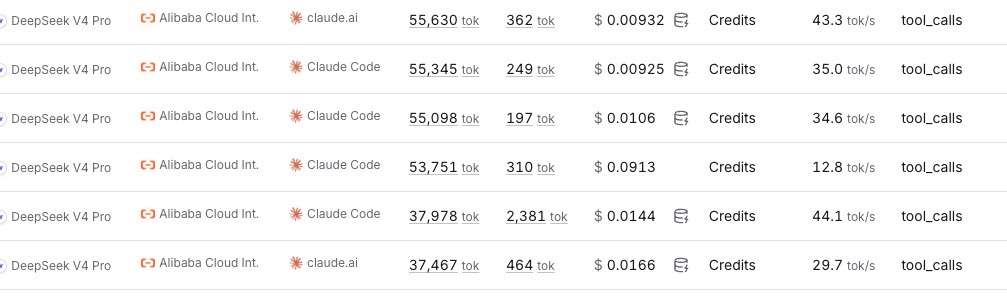
But there are two cost traps.
Prompt Caching Can Behave Differently Across Providers
Claude Code is optimized for Anthropic’s API. It may add Anthropic-specific prompt caching fields such as:
"cache_control": {"type": "ephemeral"}
That is useful for Anthropic. But if the request is routed to another provider whose cache is based on automatic prefix matching, those extra fields can change the request shape and reduce cache hits.
For a non-Anthropic model, I found it useful to disable Claude Code’s Anthropic-specific caching behavior:
export DISABLE_PROMPT_CACHING=1
export CLAUDE_CODE_DISABLE_EXPERIMENTAL_BETAS=1
The result should be verified from provider logs, not assumed. Look at the actual provider endpoint, cached token count, and per-call cost.
Provider Routing Can Break Cache Locality
If a model router sends one request to provider A and the next request to provider B, the prefix cache may not be shared. The model name can be identical while the cache is effectively cold.
For agentic workflows, provider pinning matters. A router preset should usually specify:
{
  "model": "provider/model-name",
  "provider": {
    "order": ["primary-provider", "fallback-provider"],
    "only": ["primary-provider", "fallback-provider"],
    "allow_fallbacks": true
  }
}
The tradeoff is policy, not just engineering. If the workflow contains private business data and the organization requires zero data retention, then a cheaper provider may not be acceptable. In that case, use a compliant direct provider or enterprise setup even if the token price is higher.
Cost control happens at two layers:
| Layer | What to optimize |
|---|---|
| Request layer | Stable prefix, pinned provider, cache hit rate |
| Agent loop layer | Fewer tool calls, smaller tool results, less exploration |
These two layers multiply. A good cache cannot save a messy agent loop. A clean skill cannot save a session that keeps cold-starting on different providers.
Skill Design
The skill file is where most of the workflow stability comes from. The model should not rediscover the same process every morning.
The best improvement was to move all stable knowledge into SKILL.md:
- Exact MCP tool names
- Required data sources
- Fixed SQL queries
- Output format
- Publishing rules
- Idempotency rules
- What not to read
- How to handle missing data
Before optimization, the agent may spend many tool calls discovering schemas, searching for old outputs, and reading transcript files. After optimization, the path becomes much shorter.
Useful instructions include:
The data sources are independent. Fetch all required data in the same response before synthesizing the report.
This encourages parallel tool dispatch instead of serial back-and-forth.
Another useful instruction:
Do not parse `.claude/*` transcript or tool-result internals. If a tool result is truncated, call the source tool again with a smaller limit.
This prevents a slow and fragile path where the model tries to recover data from Claude Code’s internal tool-result files.
I would also avoid complex shell patterns in the skill. The model may try heredocs, long pipes, or temporary Python scripts. Those commands are harder to permission safely. If a complex transformation is needed, put it in a small project script and let the agent call that script.
Debugging Failures
When a scheduled run fails, I check logs in this order:
logs/cron.log: did cron start the script?logs/daily-brief-YYYY-MM-DD.log: what did Claude Code print?- Claude Code transcript JSONL: which tool call failed?
reports/daily-brief-YYYY-MM-DD.md: did the main report get generated?- Provider activity logs: did routing, cached tokens, or cost look abnormal?
Then I classify the failure:
| Symptom | Likely fix |
|---|---|
| Model chose the wrong path | Update SKILL.md |
| Correct action was blocked | Add a narrow permission |
| Tool result was too large | Reduce limit or narrow the query |
| Cost jumped | Check provider routing and cache hit rate |
| Output duplicated | Add idempotency rules |
| Secret appeared in logs | Rotate secret and improve redaction |
I also recommend keeping a small improve.md or changelog for the agent workflow. Each entry should say what changed, why it changed, and what effect is expected. This is much more reliable than trying to remember why a permission or instruction exists.
Idempotency
A scheduled report must be safe to rerun.
The report should be keyed by business date, not execution timestamp. For example:
- Local file: overwrite
reports/daily-brief-YYYY-MM-DD.md - Wiki page: search for
Daily Brief - YYYY-MM-DD - If the page exists: update it
- If the page does not exist: create it
- Chat notification: say the update is ready
Without idempotency, a retry creates duplicate pages and noisy notifications. Cron workflows need reruns because network calls, MCP servers, and provider APIs can fail.
When This Pattern Works
Claude Code as a production harness agent is a good fit when:
- Inputs contain unstructured or semi-structured text
- Business rules change often
- The workflow runs daily or hourly, not every second
- A human-readable report is the final artifact
- Failures can be retried
- Logs and transcripts are acceptable for debugging
It is not a good fit when:
- The workflow needs sub-second latency
- Every step must be strongly deterministic
- The process is a simple structured ETL job
- The system cannot tolerate any missed or duplicated action
- The data policy does not allow sending context to the chosen model provider
This pattern is powerful, but it is not magic. It trades some deterministic code for a more adaptive reasoning loop. That tradeoff is only worth it when the workflow really needs adaptation.
Conclusion
Claude Code can work as a production harness agent, but it is not zero-config. The useful pattern is to put the agent inside engineering boundaries: narrow permissions, isolated secrets, observable logs, stable skills, repeatable scripts, and measurable cost.
The model handles the parts that are hard to write as deterministic code: reading messy text, adapting to small changes, and producing a coherent report. The harness handles everything that production systems care about: safety, auditability, failure handling, and repeatability.
Once a workflow runs from cron, caching, provider routing, skill design, and permissions are no longer small details. They are the difference between “it worked once” and “it can run every day.”