
LLM Inference Caching
Introduction
We might have heard KV cache, prompt caching, and prefix cache multiple times if we are deep into LLM inference. In this blog, we are trying to explain how those terms relate to each other, what their implications are towards LLM development — especially agent development — and how different LLM providers design and commercialize these caching techniques.
These terms all refer to one concept reflected or implemented at different levels of LLM inference. They are not parallel concepts but rather an encapsulation relationship: each layer builds on top of the one below.
Caching Techniques during LLM Inference
As shown in the diagram below, the four caching techniques are distributed across four layers to achieve one shared target. From the top, it is where we write the code — in some providers, the cache boundary can be controlled by developers who tell the inference engine which prefix to cache. Below that sits the business layer, the Anthropic/Gemini/OpenAI product, where a prompt caching API is exposed with different pricing strategies. Cached tokens are charged at a cheaper price. Under this commercial abstraction sits the system layer — inference frameworks including vLLM or SGLang — where prefix caching is implemented, detecting when two requests share the same leading token sequence and reusing already-computed KV embeddings. At the bottom is the physical foundation, the fundamental concept in transformer inference: KV cache stores computed key-value pairs in GPU VRAM, and cached results can be reused to skip GPU computation.
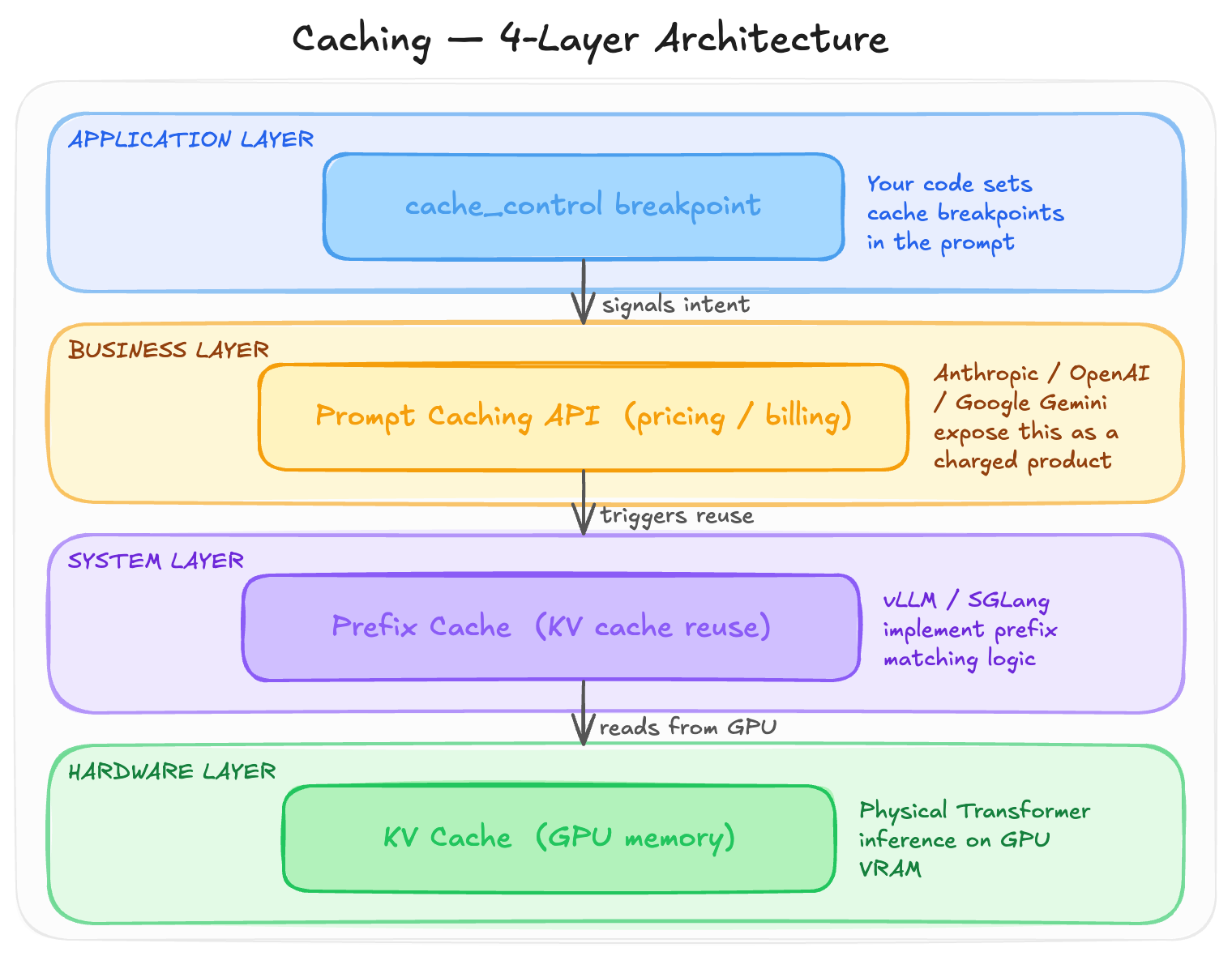
In the following sections, each layer will be explained in detail, starting from the bottom.
KV Cache (GPU Memory)
KV cache is the lowest layer — it is not a feature but an architectural reality of how transformer inference works. Every decoder-based transformer must maintain a KV cache during autoregressive generation.
When generating the N-th token, the model needs to attend to the key (K) and value (V) vectors of all previous N-1 tokens. Without caching, every new token would require a full forward pass through the entire prompt, resulting in O(N²) complexity. With the KV cache, only the new token’s K and V are computed while the previous ones are read directly from memory — reducing complexity to O(N).
The memory cost of the KV cache can be expressed as:
KV cache size = 2 × num_layers × num_heads × head_dim × seq_len × dtype_size
              = 2 × L × H × D × S × bytes
To put a concrete number on this: Llama 70B (80 layers, 64 heads, head_dim=128) at 32K context in bf16 requires:
2 × 80 × 64 × 128 × 32768 × 2 = ~40 GB
A single sequence’s KV cache alone needs 40 GB. This is why long-context inference is so memory-intensive — the bottleneck is not the model weights but the KV cache. It also explains why MU or SNDK price went to SKY. The KV cache is per-request, per-GPU, and ephemeral: once a request is done, it is deleted, and the next request starts from scratch. Therefore, we need another layer to reuse those cache across requests as we know especially in agent, one task is involoving multiple requests. So it goes to the next layer.
Prefix Cache
The prefix cache sits on top of the KV cache, adding the concept of reuse across requests. The key observation is that many requests share the same prompt prefix — system prompts, tool definitions, or conversation history. If two requests have the same leading N tokens, their K and V vectors will be identical, since attention only looks backward.
An inference engine can therefore:
- Compute K and V for the first request and retain them in GPU memory instead of deleting them
- When a second request arrives, hash the prefix to check for a match
- On a hit, reuse the K and V directly without recomputation, only computing new K and V for the diverging portion
This is what prefix cache, KV cache reuse, and automatic prefix caching all refer to — the same idea under different names.
Major inference frameworks implement this differently:
- vLLM uses PagedAttention with Automatic Prefix Caching: KV cache is stored in 16-token blocks, each block’s token sequence is hashed, and hits result in pointer reuse
- SGLang uses RadixAttention: a radix tree organizes KV cache blocks, supporting tree-shaped prefix sharing where multiple branches from the same system prompt all share cached state
- TensorRT-LLM has a similar KV Cache Reuse mechanism
Key characteristics: prefix caching is an inference engine optimization that requires nothing from the API caller. Cache invalidation is byte-level — even one mismatched token invalidates everything after it. Lifetime depends on GPU memory pressure, with LRU eviction when memory is tight. It is per-GPU and per-instance, meaning a different machine starts cold. For example, if in openrouter, for the same model, switch among different providers will ruin this caching benefit.
Prompt Caching
Prompt caching is the top layer where LLM providers package the underlying prefix cache into an API feature with commercial characteristics:
- Pricing differentiation: write tokens cost more, read tokens cost less
- TTL guarantees: the cache is explicitly held for a minimum duration (e.g., 5 minutes or 1 hour)
- Controllable cache boundaries: developers can mark where the cached prefix ends
- Observability: API responses return
cache_read_tokensandcache_creation_tokenscounters
Different providers have taken very different design philosophies for how they expose this to developers. The details will be explored in the following section.
Application Layer
The application layer is where developers make decisions that directly affect cache hit rates. The core principle is structuring prompts so that stable content comes first and variable content comes last, keeping the cacheable prefix as long and consistent as possible.
A common anti-pattern is mixing dynamic content into the system prompt:
# Bad: timestamp in system prompt busts the cache every call
system = f"You are an assistant. Current time is {datetime.now()}."

# Good: keep the system prompt stable, put variable data in the user message
messages = [
    {"role": "system", "content": "You are an assistant.",
     "cache_control": {"type": "ephemeral"}},
    {"role": "user", "content": f"[{datetime.now()}] {user_query}"}
]
The application layer decisions ultimately determine whether the lower layers can do their job effectively.
How Anthropic, OpenAI and Gemini Design Prompt Caching and Commercialize It
It is worth diving into the three different design philosophies and their corresponding API designs. In one line each:
| Provider | Philosophy |
|---|---|
| Anthropic | “You tell me what to cache” |
| OpenAI | “I automatically cache for you” |
| Gemini | “Cache is an independent resource” |
To make this concrete, consider an agent that makes repeated API calls with:
- System prompt: 5,000 tokens (agent role, rules, context)
- Tool definitions: 3,000 tokens (10 tool schemas)
- Conversation history: growing over the session
- Current user query: short
Let us walk through what two consecutive calls look like under each provider.
Anthropic: You Control It, The System Executes It
Turn 1 (first call):
response = anthropic.messages.create(
    model="claude-sonnet-4-5",
    system=[
        {
            "type": "text",
            "text": SYSTEM_PROMPT,  # 5000 tokens
            "cache_control": {"type": "ephemeral"}  # cache up to here
        }
    ],
    tools=[
        {"name": "get_gold_pnl", ...},
        {"name": "get_position", ...,
         "cache_control": {"type": "ephemeral"}}  # second breakpoint
    ],
    messages=[
        {"role": "user", "content": "What is today's gold P&L?"}
    ]
)

# usage: cache_creation_input_tokens=8000, cache_read_input_tokens=0, input_tokens=15
# Cost: cache write 8000 × $3 × 1.25/1M = $0.030
#       fresh input 15 × $3/1M           = $0.00005
#       output 250 × $15/1M              = $0.0038
#       TOTAL: ~$0.034
Turn 2 (3 minutes later, within TTL):
response = anthropic.messages.create(
    model="claude-sonnet-4-5",
    system=[... same system prompt + cache_control ...],
    tools=[... same tools + cache_control ...],
    messages=[
        {"role": "user", "content": "What is today's gold P&L?"},
        {"role": "assistant", "content": "Gold P&L is +$12k..."},
        {"role": "user", "content": "Break it down by venue"}
    ]
)

# usage: cache_creation_input_tokens=0, cache_read_input_tokens=8000, input_tokens=280
# Cost: cache read 8000 × $3 × 0.1/1M = $0.0024
#       fresh input 280 × $3/1M        = $0.00084
#       output 300 × $15/1M            = $0.0045
#       TOTAL: ~$0.0077 — 74% cheaper than without caching
Key observations: you explicitly mark the cache boundary with cache_control, write and read are tracked as separate counters so you know exactly what happened to every token, and the first call is more expensive (1.25x write) while every subsequent call is dramatically cheaper (0.1x read).
OpenAI: The System Recognizes It, You Do Nothing
# Turn 1 — identical to any normal call, no markers
response = openai.chat.completions.create(
    model="gpt-4o",
    messages=[
        {"role": "system", "content": SYSTEM_PROMPT},
        {"role": "user", "content": "What is today's gold P&L?"}
    ],
    tools=TOOL_DEFINITIONS,
)
# prompt_tokens_details: {"cached_tokens": 0}  — nothing cached yet

# Turn 2 — same code, cache kicks in automatically
response = openai.chat.completions.create(
    model="gpt-4o",
    messages=[
        {"role": "system", "content": SYSTEM_PROMPT},
        {"role": "user", "content": "What is today's gold P&L?"},
        {"role": "assistant", "content": "Gold P&L is +$12k..."},
        {"role": "user", "content": "Break it down by venue"}
    ],
    tools=TOOL_DEFINITIONS,
)
# prompt_tokens_details: {"cached_tokens": 8000}  — system recognized the prefix
# Cost saving: ~42% vs no caching
Key observations: zero code changes required, the cache activates automatically. You cannot see which specific tokens were cached, only the total count. The discount is 50% off (versus Anthropic’s 90% off). There is no write cost, but there is also no TTL guarantee — it is best-effort, roughly 5–10 minutes.
Gemini: Cache Is an Independent Object
from google import genai
client = genai.Client()

# Step 0: create a cache resource independently of any request
cache = client.caches.create(
    model="gemini-2.5-pro",
    config={
        "contents": [{"role": "user", "parts": [{"text": SYSTEM_PROMPT}]}],
        "tools": TOOL_DEFINITIONS,
        "ttl": "3600s",
        "display_name": "agentv1"
    }
)
print(cache.name)  # "cachedContents/abc123xyz"

# Turn 1 — reference the cache by name
response = client.models.generate_content(
    model="gemini-2.5-pro",
    contents="What is today's gold P&L?",
    config={"cached_content": cache.name}
)
# cached_content_token_count: 8000 — charged at 75% discount

# Gemini's unique capability: share one cache across many users
def handle_user(user_query):
    return client.models.generate_content(
        model="gemini-2.5-pro",
        contents=user_query,
        config={"cached_content": cache.name}
    )
# 1000 concurrent users all hit the same cache
# You pay 1 write cost + storage cost, every request gets 75% off
Key observations: the cache is a named object with its own lifecycle independent of any request. You must actively manage creation and deletion. Storage is billed by token-hour regardless of usage. The critical differentiator is that it is the only design that supports cross-conversation, cross-user cache sharing.
Side-by-Side Comparison
| Anthropic | OpenAI | Gemini | |
|---|---|---|---|
| Who decides what to cache? | Developer (marks breakpoints) | System (auto hash) | Developer (creates object) |
| Code changes required | Add cache_control to prompt |
None | Extra API call to manage cache object |
| Write price | 1.25x (5 min), 2x (1 hr) | Free | 1x (one-time) |
| Read price | 0.1x (90% off) | 0.5x (50% off) | 0.25x (75% off) |
| Storage cost | None | None | Yes (token-hour) |
| TTL | 5 min / 1 hr (your choice) | ~5–10 min (fixed) | You set (default 1 hr) |
| Cross-session sharing | No | No | Yes (core feature) |
| Observability | Write + read tracked separately | Only cached token count | Separate counter |
Which provider wins in which scenario:
- Single-user chat agent with growing conversation → Anthropic. Deepest discount, explicit control, no lifecycle management needed.
- Multi-user SaaS where all users share a system prompt → Gemini. One cache object shared across 1,000 users means cost amortized 1,000×.
- Simple chatbot with no caching logic → OpenAI. Zero code changes, best-effort savings.
- Agent with long-running tool calls or human-in-the-loop waits → Anthropic 1-hour TTL or Gemini with configurable TTL.
- Tree-search agents where one prefix branches into multiple paths → Gemini. One cache, multiple branches all reference it.
One interesting insight on why Anthropic charges for cache writes while OpenAI does not: Anthropic gives a cache hit guarantee — as long as you are within the TTL and the prefix matches, the hit is assured. This SLA requires actively pinning your KV cache in GPU memory, which costs something. OpenAI makes no guarantee, offering only best-effort background optimization. No promise, no charge, but also a shallower discount.
How Should We Develop Agents to Boost Caching
This is the practical section. Below are the most impactful optimizations, roughly ordered by importance.
1. Order Prompt Content by Stability
The single most important thing is to arrange prompt content from most stable to least stable:
[Most stable — unchanged for the agent's entire lifetime]
  → system prompt / role definition
  → tool definitions
  → few-shot examples

[Moderately stable — unchanged within a session]
  → user profile / project context
  → retrieved RAG documents (if session-level retrieval)

[Grows turn by turn]
  → conversation history

[Changes every call]
  → current user message
Place cache breakpoints at the boundary between stable and unstable content. If timestamps, user IDs, or other dynamic values are embedded in the system prompt, the prefix diverges on every call and cache hit rate drops to zero.
2. Keep Tool Definitions Stable
Dynamic tool lists are a common cache-busting mistake:
- Do not generate the tool list dynamically based on the query (even though it sounds smart, it busts the cache)
- Do not reorder tools between calls
- Do not put dynamic data in tool descriptions (e.g., “current account balance is $X”)
If conditional tools are genuinely needed, use a two-layer approach: a core set of tools always present and cacheable, plus additional tools described inline within the user message where they are not cached.
3. Keep Conversation History Append-Only
Any modification to prior messages invalidates the cache for everything that follows:
# Bad: rewriting history invalidates cache
history[3]["content"] = clean_up(history[3]["content"])

# Also bad: summarizing history creates a new prefix
history = [{"role": "system", "content": summarize(history)}]

# Good: strict append-only, update cache_control at the new tail
history.append({
    "role": "user",
    "content": new_msg,
    "cache_control": {"type": "ephemeral"}
})
If summarization is necessary due to context length, do it at a clean boundary and accept that you will pay one cache write cost to rebuild the prefix.
4. Use the 1-Hour TTL for Long-Running Agent Steps
The 1-hour TTL (available with Anthropic at 2x write price) makes sense when:
- Agent tool calls take more than 5 minutes (database queries, API calls, human approval)
- Users may step away and return mid-session
- Batch tasks span across multiple hours
Paying 2x for the write is still cheaper than re-writing the cache twice (1.25x + 1.25x) when the 5-minute window expires between steps.
5. Pin the Provider Within a Conversation
When using multi-provider routing or fallback logic:
- The same conversation must always go to the same provider — switching providers resets the cache entirely
- Never switch models mid-conversation for the same reason (different model = different KV cache pool)
- Different users can be on different providers without any issue
Now, it is supported as a default model in those services as openrouters.
6. Cache Tool Results at the Application Layer
Providers do not cache tool call results, but agents often call the same tool repeatedly with identical parameters. A simple in-process cache covers this:
@lru_cache(maxsize=1000)
def cached_file_read(path: str, mtime: float):
    return open(path).read()

def read_file_tool(path):
    mtime = os.path.getmtime(path)
    return cached_file_read(path, mtime)
Using file modification time as the cache key means unchanged files are read once. The same pattern applies to read-only SQL queries, HTTP GET calls, and deterministic computations. It means for a same tool with the same arguments, the results can be resued if we cache when it was called at first time.
7. Monitor Cache Hit Rate
Every response includes cache_read_input_tokens and total input_tokens. Tracking their ratio over time gives you the cache hit rate. Below 70% is a signal to investigate:
- Has dynamic content crept into the system prompt?
- Did a multi-provider router switch providers mid-conversation?
- Is history being mutated somewhere?
A simple time-series panel showing cache hit rate is one of the most useful observability signals for an agent system.
Summary: The Top Three
If you can only optimize three things:
- Keep the system prompt and tool definitions completely byte-stable across calls (highest impact)
- Maintain conversation history as strictly append-only, with cache breakpoints at the tail
- Pin the provider per conversation and monitor cache hit rate
Conclusion
KV cache, prefix cache, and prompt caching are not three separate ideas — they are the same mechanism expressed at three different layers of the stack. Understanding the full picture, from GPU memory management up to API pricing design, helps make better decisions at every level.
The three major providers have made genuinely different design trade-offs. Anthropic gives the most control and the deepest discount but requires explicit annotation. OpenAI requires nothing but offers shallower savings. Gemini treats the cache as a first-class resource, which is the only design that scales across many users sharing the same content.
For most agent developers, the highest-leverage work is not choosing the right provider but rather disciplined prompt structure: stable content first, variable content last, history append-only, and tool definitions that never change between calls. These decisions compound — a well-structured prompt consistently achieves 70–90% cache hit rates, which can cut inference costs by more than half over a long session.